















Uno Online
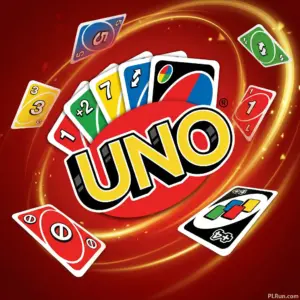
Uno Online is a multiplayer card game based on the classic UNO rules — match cards by color or number, play action cards to disrupt opponents, and be the first to empty your hand. Published by Ubisoft as an HTML5 browser game, you can play free on PLRun with no download and no sign-up required.
At a Glance
- Genre:Card Game / Multiplayer / Casual Strategy
- Developer:Ubisoft
- Controls:Mouse click or tap to play cards
- Platform:Browser (desktop, mobile, tablet) — HTML5
- Difficulty:Easy to learn, medium to master
- Rating:4.4 / 5 (252 votes)
- Released:February 10, 2026
About Uno Online
Uno Online faithfully recreates the classic UNO card game in a digital format with online multiplayer and AI opponents. The deck contains 108 cards across four colors — red, blue, green, and yellow — including numbered cards (0–9), action cards (Skip, Reverse, Draw Two), and Wild cards (Wild, Wild Draw Four). Each player starts with seven cards, and the goal is to discard all of them before anyone else.
The strategic depth comes from action card timing and color control. Knowing when to play a Skip to block an opponent who’s about to call UNO, when to hold a Wild Draw Four for a critical moment, and how to manipulate the active color to match your hand — these decisions separate casual players from consistent winners. Every round plays out differently because the card distribution and opponent behavior are always unpredictable.
UNO was originally created by Merle Robbins in 1971 and is now owned by Mattel. The game belongs to the “crazy eights” family of shedding-type card games. Ubisoft’s digital adaptation adds smooth matchmaking, clean card animations, and the ability to play against real opponents or AI from any browser.
How to Play Uno Online
Basic Controls
Click or tapa card in your hand to play it on the discard pile. The game only allows valid plays — the card must match the top discard bycolorornumber/symbol. If you can’t play, click or tap theDraw Pileto draw a card. When you’re down to one card, press theUNO buttonbefore the next player takes their turn. On mobile, all controls work via tap.
Game Setup and Turn Flow
Each player is dealt7 cardsat the start. The top card of the Draw Pile is flipped to start the Discard Pile. Players take turns clockwise (unless a Reverse card changes direction). On your turn, you either play a matching card or draw from the pile. If the drawn card is playable, you can play it immediately.
Action Cards
Action cards create the strategic tension in every match:
- Skip— The next player loses their turn entirely.
- Reverse— Flips the direction of play. In a two-player game, this functions like a Skip.
- Draw Two (+2)— The next player draws two cards and loses their turn. Per official Mattel rules, stacking +2 on +2 isnot allowed.
- Wild— Play it on any card. You choose the next active color.
- Wild Draw Four (+4)— The next player draws four cards and loses their turn. You choose the next color. This card can only be legally played when you have no cards matching the current discard color.
The Challenge Rule
When a Wild Draw Four is played against you, you canchallengethe player who played it. If the challenge reveals they had a card matching the discard color (meaning they played the +4 illegally), the offending player draws 4 cards instead. If the challenge fails, you draw6 cards(the original 4 plus a 2-card penalty). This risk-reward mechanic adds a bluffing layer to the game.
Calling UNO and Winning
When you play your second-to-last card, you must press theUNO buttonbefore the next player takes their turn. If you forget and another player catches you, you draw2 penalty cards. The round ends when a player successfully discards their last card. In scored games, number cards count face value, action cards count 20 points, and Wild cards count 50 points.
Uno Online Pro Tips and Strategies
- Control the active color to match your hand.If you hold three red cards, use Wilds and color-matching plays to shift the active color to red. This lets you chain plays across multiple turns and shed cards faster than opponents.
- Save action cards for the endgame.Skip, Reverse, and Draw Two are most valuable when opponents are close to going out. A well-timed Skip on a player with one card left can buy you the turn you need to win.
- Hold your Wild Draw Four until you have no matching color.Playing a +4 when you hold a matching color card is an illegal play under official rules. If an opponent challenges you and wins, you’ll draw 4 cards yourself — a devastating swing.
- Watch opponent card counts obsessively.Once any player drops to 2–3 cards, shift to a defensive strategy. Prioritize playing Skip and Reverse to deny them turns, and use Draw Two or Wild Draw Four to force them to pick up cards.
- Don’t forget to press the UNO button.The 2-card penalty for failing to call UNO is one of the most common reasons players lose winnable games. Build the habit of pressing it immediately when you play your second-to-last card.
- Use Reverse strategically in two-player games.In a 1v1 match, Reverse acts as a Skip — it gives you an extra turn. Chaining a Reverse into another play on your bonus turn is one of the strongest moves available.
- Bluff with Wild Draw Four when the risk is low.If you’re confident your opponent won’t challenge, playing a +4 even when you hold a matching color can devastate their hand. Assess whether your opponent tends to challenge or accept penalties before bluffing.
Game Features
- Official UNO rule set— Faithful adaptation of Mattel’s classic card game, including the Challenge rule for Wild Draw Four.
- Multiplayer and AI modes— Play against real opponents online or practice against computer-controlled players.
- 108-card deck across 4 colors— Full UNO deck with numbered cards (0–9), action cards (Skip, Reverse, Draw Two), and Wilds.
- UNO call mechanic— Press the UNO button when you’re down to one card or risk a 2-card penalty if caught.
- Turn-based strategic play— Color control, action card timing, and bluffing with Wild Draw Four create layered decision-making each round.
- Cross-device HTML5 play— Runs in any modern browser on desktop, mobile, and tablet with no installation required.
Why Play Uno Online on PLRun?
- Instant play— No downloads, no plugins, no app store. Click and start a match immediately.
- No account required— Jump straight into a game without signing up or logging in.
- Mobile-friendly— Fully optimized for touchscreen with tap-to-play card controls.
- Smooth browser performance— PLRun’s HTML5 player loads fast and delivers stable gameplay across all devices.
Games Similar to Uno Online
- Match Masters— A competitive multiplayer puzzle game with turn-based strategy and opponent disruption mechanics similar to UNO’s action cards.
- Among Us— A multiplayer social game with bluffing and deduction, sharing UNO’s social deception and player interaction energy.
- 8 Ball Pool— A turn-based multiplayer game with strategic shot planning that mirrors UNO’s think-ahead gameplay.
- Blendrix— A color-matching casual game with quick rounds and pattern recognition, appealing to UNO’s card-matching playstyle.
- Smash Karts— A multiplayer party game with the same quick-match, high-replay social energy as UNO.
FAQ
Is Uno Online free to play?
Yes. Uno Online is completely free to play in your browser on PLRun. No download is required — just open the page and start playing instantly against other players or AI opponents.
Can I stack Draw Two cards on each other?
No. According to official Mattel UNO rules, youcannotstack a +2 on top of another +2 to make the next player draw 4. When a Draw Two is played on you, you must draw two cards and lose your turn. The same applies to Wild Draw Four — stacking is not allowed.
What happens if I forget to call UNO?
If you play your second-to-last card without pressing the UNO button and another player catches you before the next turn begins, you must draw2 penalty cards. If no one catches you in time, there is no penalty.
Can I play Wild Draw Four at any time?
Officially, you can only play a Wild Draw Four when you haveno cards matching the current discard color. If an opponent suspects you played it illegally, they can challenge you. If the challenge succeeds, you draw 4 cards instead of them.
Can I play Uno Online on my phone?
Yes. This HTML5 version runs on mobile and tablet browsers with full touchscreen support. Tap cards to play them and tap the draw pile or UNO button as needed. No app installation is required.
Who made the original UNO game?
UNO was created byMerle Robbinsin 1971 in Reading, Ohio. It is now owned byMattel. The digital Uno Online version is developed and published byUbisoft.
Pleaseloginto comment.