











Orbit Beats
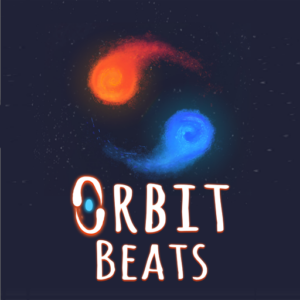
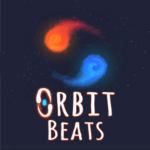
Two planets. One button. Every beat decides whether you survive or shatter. Orbit Beats is a one-button rhythm game where you guide two orbiting planets — Fire and Ice — along twisting geometric paths by tapping in perfect sync with the music. Play it free in your browser right now on PLRun.
About Orbit Beats
Orbit Beats is a rhythm-based arcade game published byAzgamesand released inOctober 2025. Inspired by games like A Dance of Fire and Ice, it strips rhythm gameplay down to its purest form: one button, two orbiting planets, and music that demands flawless timing. Each tap advances the Fire and Ice planets one step forward along a winding track. Tap in rhythm and they glide smoothly through turns. Miss the beat — even slightly — and the planets shatter instantly, ending your run.
What keeps players hooked is the escalating challenge across multiple themed worlds. Early levels teach steady rhythm on straight paths, while later worlds throw zigzags, spirals, sharp corners, and tempo changes that test reflexes and musicality. The minimalist cosmic visuals, calibration system, and skill grading make this free online game a standout in the rhythm genre. As a browser game, it requires no installation and runs smoothly on any device.
How to Play Orbit Beats
Basic Controls
Orbit Beats uses a single input — one button controls everything:
- Spacebar (PC):Tap to the beat to move forward
- Left Mouse Click (PC):Same as spacebar — click to the beat
- Screen Tap (Mobile):Touch in rhythm with the music
- Esc / Pause Button:Pause or restart the level
There are no combos, no multi-key inputs, and no held buttons. Every interaction is a single, precisely timed tap. The simplicity of the controls is what makes the precision so demanding — there’s nothing to hide behind except your rhythm.
How Movement Works
Each tap advances the two orbiting planets — one red (Fire) and one blue (Ice) — by exactly one tile along the path. The planets orbit around each other continuously, and your taps must land at the exact moment they align with the next tile on the track.
The path is not always straight. It twists, curves, and changes direction constantly. Straight segments demand steady, evenly spaced taps. Corners and turns require you to adjust your timing — sometimes speeding up, sometimes pausing an extra beat — to match the path’s geometry to the music’s rhythm.
Worlds and Progression
Orbit Beats featuresmultiple themed worlds, each with unique visual styles, musical tracks, and rhythmic patterns. You start in World 1 with simple, slow-tempo straight paths. As you progress:
- Early worldsteach fundamental rhythm with forgiving timing windows
- Mid worldsintroduce curves, angled paths, and tempo changes
- Later worldsfeature spirals, zigzags, sharp turns, and unpredictable beat-driven obstacles at high speed
Each world unlocks after completing the previous one. The combination of new music, fresh visual themes, and escalating complexity ensures that no two stages feel the same.
What Ends Your Run
Any mistimed tap causes the two planets to lose balance and fall off the track immediately. The run resets to the beginning of the level or the last checkpoint. Specific failure triggers include:
- Tapping too early— The planets move before the next tile is ready
- Tapping too late— The planets miss the landing window and fall off course
- Double-tapping— Two quick taps in succession move the planets two steps, overshooting the intended position
- Missing the first beat— The opening tap after the countdown is critical; missing it causes an instant reset
There are no health bars, no second chances, and no forgiveness. One wrong tap ends everything.
Calibration Mode
Orbit Beats includes acalibration systemthat lets you fine-tune the audio-visual sync for your specific device. This is especially important because even small latency differences between devices can throw off your rhythm. The calibration mode measures your tap consistency down to milliseconds and adjusts the game’s timing offset accordingly. Running calibration before your first serious session is strongly recommended.
Skill Grading
After calibration tests and level completions, the game rates your consistency and precision. This grading system tracks your improvement over time, giving you a concrete measure of progress beyond just “did I finish the level.”
Orbit Beats Tips and Strategies
1. Nail the First Tap — It Sets the Entire Run
The countdown at the start of each level leads directly into your first tap. If you miss it or time it poorly, the planets fall immediately. More importantly, a clean first tap establishes the rhythmic foundation for the rest of the run. Treat the countdown as a metronome: count along with it, and let the first tap flow naturally from that rhythm.
2. Listen to the Music, Don’t Just Watch the Screen
The visual track shows you where to go, but the music tells you when to tap. Many players make the mistake of relying entirely on sight, which fails on complex paths where visual cues become overwhelming. Train yourself to tap based on the beat first and use the visual track as secondary guidance. Your ears are more precise than your eyes for rhythm.
3. Count Beats in Your Head on Steady Sections
When the path runs straight for several tiles, the rhythm is usually constant. Silently counting “1, 2, 3, 4” in time with the beat helps you maintain consistent spacing between taps. This technique prevents the common error of gradually speeding up or slowing down during long straight sections, which causes a mistimed tap when the path eventually curves.
4. Don’t Rush — Rhythm Beats Speed
The urge to tap quickly is strong, especially on fast-tempo tracks. But speed without rhythm is guaranteed failure. Focus on matching the music’s tempo precisely rather than clicking as fast as possible. A calm, measured tap in perfect time will always outperform a frantic, panicked click that’s a fraction of a second off.
5. Watch Ahead, Not Where You Are
Keep your eyes on the upcoming path, not the planets’ current position. Curves, turns, and direction changes require slight timing adjustments, and you need to see them coming. If you fixate on where the planets currently sit, every turn will catch you off guard. Scan two to three tiles ahead and prepare your rhythm for what’s next.
6. Calibrate Before Every Serious Session
Device latency varies between browsers, computers, and phones. Running the calibration mode at the start of each session ensures the game’s timing matches your hardware. A miscalibrated setup makes the game feel “off” even when your rhythm is correct, leading to frustrating failures that aren’t your fault. Calibration takes seconds and saves entire runs.
7. Embrace Failure — Every Reset Teaches Something
You will fail constantly in Orbit Beats. That’s by design. Each failure pinpoints exactly where your timing broke down — was it too early on a curve? Too late after a straight? A double-tap on a sharp corner? Every reset is a data point. Players who mentally note their failure point and adjust their approach improve dramatically faster than those who mindlessly retry without reflection.
Game Features
- One-button controls— Spacebar, mouse click, or screen tap; nothing else needed
- Dual orbiting planet system— Guide Fire (red) and Ice (blue) through winding paths in synchronization
- Pure rhythm gameplay— Every tap must match the beat; no distractions, no gimmicks
- Multiple themed worlds— Each world features unique music, visuals, and rhythmic challenges
- Progressive difficulty— Paths evolve from simple straights to spirals, zigzags, and sharp turns
- Calibration mode— Fine-tune audio-visual sync to your device for precise timing
- Skill grading system— Track your consistency and precision improvement over time
- Cosmic minimalist visuals— Glowing, clean graphics with smooth animations that keep focus on rhythm
- Instant restart— Zero downtime between failures and new attempts
- Checkpoint system— Resume from the last checkpoint instead of replaying the entire level
- Single-player experience— Focus entirely on personal mastery
- Cross-platform play— Works on desktop and mobile browsers
Why Play Orbit Beats on PLRun?
- No download required— Play instantly in your browser without installing anything
- No sign-up needed— Jump straight into the first world with zero registration
- Mobile-friendly— One-tap controls work perfectly on phones and tablets
- Completely free— No paywalls, no premium worlds, no hidden fees
- Discover more games— Love rhythm and arcade games? Try Geometry Dash, Tap Drift, and other beat-driven games in our Music and Arcade game collections
Games Similar to Orbit Beats
- A Dance of Fire and Ice— The rhythm game that directly inspired Orbit Beats, featuring two rotating balls that move along a track on every beat
- Geometry Dash— A fast-paced platformer with rhythm-based jumps, geometric obstacles, and custom user-created levels
- Friday Night Funkin’— A popular rhythm game where you match arrow keys to the beat in musical duels against quirky opponents
- Tap Road— A one-tap rhythm game where you guide a ball along a colorful road by tapping in time with the music
- Sprunki— A fan-made music creation game inspired by Incredibox, where you build your own beats and sounds
FAQ
Is Orbit Beats free to play?
Yes, Orbit Beats is completely free to play on PLRun. All worlds, levels, and features — including calibration mode and skill grading — are accessible without any payment. There are no in-app purchases or premium tiers.
Can I play Orbit Beats on mobile?
Absolutely. Orbit Beats is an HTML5 browser game that works on desktop, tablet, and mobile devices. On mobile, tap the screen in rhythm with the music to guide the planets forward. The one-touch controls are perfectly suited to touchscreens. No app download is needed.
How do you play Orbit Beats?
Tap the spacebar, click the mouse, or tap the screen in perfect sync with the music. Each tap moves two orbiting planets — Fire and Ice — one step forward along a winding geometric path. Stay in rhythm to keep them on track. Miss a beat or tap off-time and the planets shatter instantly, resetting you to the start or last checkpoint. Progress through multiple worlds with escalating difficulty, from simple straight paths to complex spirals and sharp turns.
Is Orbit Beats hard?
Yes, Orbit Beats is designed to be easy to learn but very difficult to master. The one-button control is simple, but the rhythm-based timing demands practice, patience, and musical awareness. Later worlds feature fast tempos, tight turns, and unpredictable beat changes that challenge even experienced rhythm game players. Expect many failures — they are part of the learning process.
Is Orbit Beats safe for kids?
Yes. Orbit Beats features clean, colorful cosmic visuals with no violence, inappropriate content, or in-app purchases. The simple one-button control scheme is accessible for younger players, though the difficulty may be challenging for very young children. It is suitable for all ages.
Does Orbit Beats require a download?
No. Orbit Beats runs entirely in your web browser as an HTML5 game. There is nothing to download or install — just visit PLRun, click play, and start tapping. It works on Chrome, Firefox, Safari, Edge, and other modern browsers.
Pleaseloginto comment.