













Police Drive
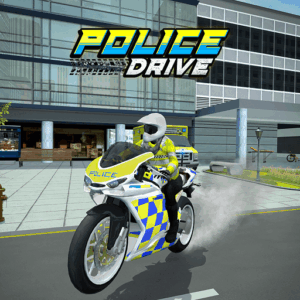
Hit the sirens, floor the accelerator, and chase down criminals across a massive open city.Police Driveis a 3D police action driving simulator where you patrol city streets, pursue suspects through traffic, and complete high-stakes law enforcement missions — all from the seat of upgradeable police cars and motorbikes. Play this free online game instantly on PLRun — no download, no sign-up, just pure cop car action in your browser.
About Police Drive
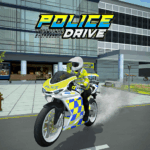
Police Drive is a 3D open-world driving simulator published byAzGamesand released onJanuary 22, 2026. You take on the role of a police officer tasked with patrolling a sprawling city, responding to crime alerts, and chasing down suspects in high-speed pursuits. Unlike basic racing games, Police Drive combines mission-based objectives with vehicle management — you need to monitor your car’s health, watch your fuel, and strategically upgrade your fleet to handle tougher assignments. The game features both police cars and motorbikes, each with unique handling characteristics, plus a deep upgrade system funded by mission rewards. With stunning 3D graphics, realistic driving physics, and accessible controls, it delivers one of the most immersive police simulator experiences available as an HTML5 browser game. Short missions and instant restarts make it a perfect free online game for both quick sessions and extended play.
How to Play Police Drive
Each session starts at your base where you choose a vehicle and accept missions. Your goal is to complete objectives across the city as efficiently as possible while keeping your vehicle intact. Here’s a full breakdown of every system.
Basic Controls
- W / Up Arrow— Accelerate
- S / Down Arrow— Brake and reverse
- A / D or Left / Right Arrow— Steer left and right
- Left Mouse Click— Enter/exit vehicle, interact with objects, activate police equipment
The controls mirror standard driving game conventions, so anyone familiar with car games can jump in immediately. Steering sensitivity increases with speed, so gentle inputs matter more at high velocity.
Selecting Your Vehicle
Before each mission, you choose between police cars and motorbikes from your garage. Each vehicle type handles differently:
- Police cars— Higher top speed, better durability, and stronger collision impact. Ideal for highway chases and ramming suspects.
- Motorbikes— Faster acceleration, tighter turning radius, and the ability to weave through dense traffic. Best for narrow streets and quick-response missions.
As you progress and earn money, you unlock additional vehicles with improved base stats. Your choice of vehicle should match the mission type — wide-open highway pursuits favor cars, while urban arrest missions favor bikes.
Mission Types
Police Drive features a variety of mission objectives that rotate as you progress:
- Criminal chase— Pursue a fleeing suspect through traffic until you catch or crash their vehicle. The suspect drives aggressively and takes unpredictable turns.
- Suspect arrest— Navigate to a marked location and apprehend a suspect on foot. Speed to the target zone matters, but arriving with a damaged vehicle slows you down.
- Hostage rescue— Reach a critical location within a time limit. High-pressure missions where every wrong turn costs valuable seconds.
- City patrol— Respond to multiple crime alerts scattered across the map. Requires efficient route planning between waypoints.
A guiding arrow on-screen always points toward your current objective. Follow it, but watch the road — blindly chasing the arrow through traffic leads to crashes.
[Screenshot alt-text: Police Drive mission in progress — arrow guiding player through city streets toward a criminal target]
Earning Money and EXP
Every completed mission rewards you with in-game money and experience points. Faster completions and cleaner runs (fewer collisions, less vehicle damage) yield higher payouts. EXP accumulates toward your officer rank, which unlocks access to tougher missions with better rewards. Money funds your entire progression through the vehicle and upgrade system.
Vehicle Upgrades
Earned money can be spent on upgrading your vehicles across several performance categories:
- Speed— Increases top velocity for highway pursuits and timed missions.
- Acceleration— Faster launch from stops and quicker recovery after braking.
- Handling— Tighter steering response and better grip through turns.
- Durability— Increases the damage your vehicle can absorb before performance degrades.
- Fuel efficiency— Extends your operational range before needing to refuel.
Each upgrade tier costs more than the last, so prioritizing which stats to boost first significantly impacts your mission success rate.
[Screenshot alt-text: Police Drive upgrade screen with speed, handling, and durability stat bars for a police car]
Health Bar and Vehicle Condition
Two critical meters run simultaneously during every mission:
- Health bar— Your officer’s health drains from collisions and hazards. If it hits zero, the mission fails immediately.
- Vehicle condition— Damage from crashes degrades steering responsiveness, top speed, and acceleration. A heavily damaged vehicle handles sluggishly even if your health bar is still high.
Running out of fuel is another mission-ending condition. Monitor the fuel gauge and avoid unnecessary detours that burn gas without progressing the objective.
Police Drive Tips and Strategies
1. Upgrade Durability Before Speed
New players rush to upgrade top speed, but a fast car that crumbles on the first collision is useless in traffic-heavy missions. Durability lets you absorb incidental crashes — clipping a taxi, brushing a barrier, bumping a suspect’s vehicle — without losing performance. Invest in at least two durability levels before touching speed upgrades.
2. Use Motorbikes for Urban Arrest Missions
Cars feel powerful, but in tight city blocks with dense traffic, a motorbike gets you to the target zone significantly faster. The ability to weave between cars and make sharp turns through narrow streets shaves seconds off every urban mission. Save your police car for open highway chases where top speed matters.
3. Follow the Arrow but Plan Your Own Route
The guiding arrow shows direction, not the optimal path. Sometimes the arrow points through a congested intersection or a narrow alley that slows you down. Glance at the arrow for general direction, then choose wider streets and clearer lanes to maintain speed. Experienced players learn the city layout and find shortcuts the arrow doesn’t suggest.
4. Brake Before Turns, Not During
Braking mid-turn causes your vehicle to slide wide and often crash into obstacles or oncoming traffic. Slow down before you reach the turn, then steer through at controlled speed and accelerate on exit. This cornering technique preserves vehicle condition and keeps you on the optimal line through intersections.
5. Don’t Ram Suspects Head-On
In chase missions, approaching a fleeing suspect from directly behind and ramming them seems intuitive but damages your vehicle heavily. Instead, pull alongside and use a side-push to force them off the road or into an obstacle. Side contact deals less damage to your vehicle while being just as effective at stopping the suspect.
6. Monitor Fuel on Long Patrol Missions
Patrol missions send you to multiple waypoints across the city, burning far more fuel than single-objective missions. If your fuel gauge drops below a quarter, abort the farthest waypoint and complete the closer ones first. A failed mission from running out of fuel earns you nothing — a partially completed patrol still pays something.
7. Reinvest Early Earnings Into Fuel Efficiency
Fuel efficiency is the least exciting upgrade, but it pays dividends across every single mission. Higher efficiency means more missions per session, more money earned, and fewer frustrating fuel-related failures. One or two early levels of fuel efficiency compound into significantly higher total earnings over time.
Game Features
- Open-World 3D City— A massive, detailed urban environment with highways, residential blocks, downtown corridors, and industrial zones.
- Multiple Vehicle Types— Choose between police cars and motorbikes, each with distinct handling and performance profiles.
- Diverse Mission Objectives— Criminal chases, suspect arrests, hostage rescues, and city patrol rotations keep gameplay varied.
- Deep Upgrade System— Boost speed, acceleration, handling, durability, and fuel efficiency across your entire fleet.
- Realistic Driving Physics— Weight-based steering, momentum-sensitive braking, and collision-responsive handling.
- Vehicle Condition Mechanics— Crash damage progressively degrades performance, rewarding careful driving.
- EXP and Rank Progression— Level up your officer rank to unlock tougher missions and better rewards.
- Police Equipment— Activate sirens and gear to aid your missions.
- Stunning 3D Graphics— Immersive cityscapes with dynamic traffic, lighting, and detailed vehicle models.
- Instant Mission Restarts— Fail a mission and jump right back in with no loading delays.
Why Play Police Drive on PLRun?
- No download required— Police Drive runs entirely in your browser as an HTML5 game. Open the page and start your patrol.
- No account needed— Jump into your first mission without sign-ups, logins, or email verification.
- Works on any device— PLRun is optimized for desktop, laptop, tablet, and mobile browsers with responsive controls.
- More driving games available— Love car action? Browse hundreds of free racing, action, and simulation games on PLRun.
Games Similar to Police Drive
If Police Drive’s high-speed law enforcement hooked you, try these related games on PLRun:
- Dude Theft Auto— An open-world sandbox driving game with vehicle access, chaotic city gameplay, and freedom to explore a massive urban environment.
- Rob A Car— An action driving game that flips the perspective — steal vehicles and outrun the law in fast-paced urban getaways.
- Crazy Taxi— A classic arcade-style driving game where speed and passenger delivery under time pressure create nonstop action.
- Rooftop Rush— A fast-paced urban action game with quick reflexes and obstacle dodging through a city setting.
- Slope Rider 3D— An endless 3D runner with speed-based gameplay and reflex-driven obstacle avoidance for fans who love the adrenaline rush.
FAQ
Is Police Drive free to play?
Yes, Police Drive is completely free to play on PLRun. There are no paywalls, premium content, or in-app purchases. All vehicles, upgrades, missions, and game content are fully accessible without spending any real money.
Can I play Police Drive on mobile?
Yes. Police Drive is an HTML5 game that runs in any modern mobile browser. It supports touch controls on iPhone, Android, and tablets, so you can chase criminals on the go without downloading an app. Just visit PLRun on your mobile browser and start playing.
How do you play Police Drive?
Drive with WASD or arrow keys and interact using left mouse click. Choose a police car or motorbike from your garage, accept a mission, and navigate the open-world city to complete objectives like chasing criminals, arresting suspects, or rescuing hostages. Earn money from completed missions and spend it on vehicle upgrades to tackle tougher assignments.
What types of missions are in Police Drive?
Police Drive features multiple mission types including high-speed criminal chases, on-location suspect arrests, timed hostage rescues, and multi-waypoint city patrols. Each mission type demands different driving strategies and vehicle choices. Missions escalate in difficulty as your officer rank increases.
Is Police Drive safe for kids?
Yes. Police Drive features cartoon-style 3D graphics with no graphic violence, blood, or inappropriate content. The gameplay focuses on driving and mission completion rather than combat. Players take on the role of a police officer protecting the city, making it a positive, action-oriented experience suitable for players of all ages.
Does Police Drive require a download?
No download or installation is needed. Police Drive is a browser-based HTML5 game that loads directly on PLRun. It works on Chrome, Firefox, Safari, Edge, and all major browsers on both desktop and mobile devices.
Game controls
WASD or the arrow keys: Control the vehicle.
Left mouse click to enter the car, use the police equipment, and more.
It’s now time to take on different missions in Police Drive. Try it now and do your best to stop criminals and dangers.
Pleaseloginto comment.