













RIVALS FPS: Online Shooter
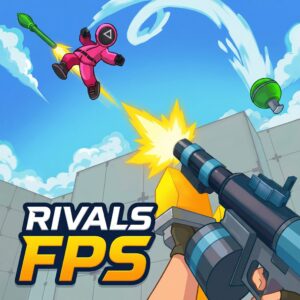
RIVALS FPS: Online Shooter is a fast-paced multiplayer FPS game that drops you into colorful, blocky 3D arenas for intense real-time battles against players worldwide. Often described as Counter-Strike meets Lego, this free online browser game delivers quick matches, deep weapon variety, and competitive leaderboards — all playable instantly on PLRun with no download required.
About RIVALS FPS: Online Shooter
RIVALS FPS: Online Shooter is a multiplayer arena FPS game developed byEccentric Studio Gamesand released on March 10, 2026 as an HTML5 browser game built on Unity WebGL. The game stands out with its bright, Lego-inspired 3D visual style paired with serious competitive shooting mechanics. Matches support 2 to 8 players per room and are designed to last only a few minutes, making them ideal for quick sessions. Players earn in-game Cash and Gems through match performance and daily logins, which fund weapon unlocks, skins, and character clothing. With game modes ranging from Team Deathmatch to Battle Royale, multiple maps, and global leaderboards, RIVALS FPS has quickly gained traction as one of the most accessible browser-based FPS games available.
How to Play RIVALS FPS: Online Shooter
After loading the game, you land in the lobby where you can set up your loadout, browse the shop, and enter the Combat Center portal to start a match. Once inside, the action begins immediately — hunt opponents, use cover, and rack up eliminations to earn rewards and climb the leaderboard.
Basic Controls
| Action | Key/Input |
|---|---|
| Move | W, A, S, D |
| Aim / Look around | Mouse |
| Shoot | Left Mouse Button |
| Jump | Spacebar |
| Crouch | C |
| Interact | E |
These controls follow standard FPS conventions. Exact keybinds may vary slightly depending on the browser port — check in-game settings if any key feels different.
Joining a Match
From the lobby, walk into theCombat Center portalto enter matchmaking. You can also use theFriends/Party tabto invite friends and queue together. The game automatically assigns you to a room with 2–8 players based on availability.
Game Modes
RIVALS FPS offers several distinct modes to keep matches varied:
- Team Deathmatch— Two teams compete to reach the elimination target first. Coordination and team pushes are essential.
- Battle Royale— A survival mode where the last player standing wins. The play area typically shrinks over time, forcing encounters.
- Free For All— Every player for themselves. Pure aim and positioning decide the winner.
- 1v1 / Duels— Head-to-head matches for players who want focused, high-stakes combat.
Weapons and Loadouts
The game features multiple weapon categories:
- Primary weapons— Assault rifles, sniper rifles, and shotguns for your main firearm slot.
- Secondary weapons— Pistols and compact sidearms as backup options.
- Melee weapons— Close-range options for tight situations.
Each weapon handles differently in terms of fire rate, damage, and accuracy. You can unlock new weapons by earning Cash and Gems from matches and daily login rewards, then spending them in the in-game shop.
Progression System
RIVALS FPS features a deep progression loop:
- Cash— Earned from match performance. Used to buy weapons, skins, and gear.
- Gems— A premium currency earned through daily logins and achievements. Used for exclusive cosmetics and clothing.
- Leaderboards— Global rankings update after every match. Consistent performance moves you up the board.
RIVALS FPS: Online Shooter Tips and Strategies
1. Strafe Constantly During Firefights
Standing still in RIVALS FPS is a death sentence. Move side-to-side while shooting to make yourself a harder target. Because the game rewards quick reactions and the time-to-kill is fast, even a small amount of lateral movement can cause opponents to miss crucial shots.
2. Use Cover Between Engagements
The colorful maps are full of walls, crates, and structures. After each kill or when reloading, break line of sight by ducking behind cover. Positioning behind solid objects before peeking gives you a major advantage over players who run in the open.
3. Learn Map Spawn Points
Each map has predictable spawn zones and high-traffic corridors. After a few matches on the same map, you will start recognizing where enemies tend to appear. Pre-aiming these spots as you move through the map dramatically increases your first-shot advantage.
4. Stick Together in Team Deathmatch
Solo flanking works occasionally, but coordinated pushes with teammates almost always win trades. When two or more players peek a corner simultaneously, the enemy can only aim at one of you — the other gets a free shot. Use the Friends/Party tab to queue with people you can communicate with.
5. Claim Daily Login Rewards Consistently
The progression system rewards daily engagement with Cash and Gems. Even if you only have time for one match, logging in and collecting your reward compounds quickly. Players who log in consistently can unlock premium weapons and skins significantly faster than those who play sporadically.
6. Match Your Weapon to the Map
Sniper rifles dominate on open maps with long sightlines, while shotguns and SMGs excel in tight, close-quarters arenas. Before a match starts, glance at the map layout and switch your loadout accordingly. Using a sniper on a cramped map or a shotgun in an open field puts you at an immediate disadvantage.
7. Crouch-Peek Around Corners
Pressing C to crouch lowers your hitbox and makes you a smaller target when peeking corners. Many opponents aim at head height by default, so crouching before stepping out of cover causes their first shots to miss above you. Combine this with strafing for maximum effectiveness.
Game Features
- Real-time multiplayer— Online PvP battles with 2 to 8 players per room, with global matchmaking.
- Multiple game modes— Team Deathmatch, Battle Royale, Free For All, and Duels keep gameplay varied.
- Blocky 3D graphics— A colorful, Lego-inspired art style that runs smoothly on any modern browser with no lag.
- Diverse weapon arsenal— Primary, secondary, and melee weapon categories with distinct stats and handling.
- Character customization— Spend Cash and Gems on skins, outfits, and clothing for your character.
- Deep progression system— Daily login rewards, match-based earnings, and a global leaderboard.
- Quick match format— Matches last just a few minutes, perfect for short gaming sessions.
- Friends/Party system— Invite friends and queue into matches together through the lobby.
Why Play RIVALS FPS: Online Shooter on PLRun?
- Instant play— No download, no installation, no sign-up. Load the game and start shooting in seconds.
- Mobile-friendly— Runs on phones and tablets through the browser with touch-adapted controls.
- Completely free— No paywalls or subscriptions required to access any core gameplay.
- Discover more— Browse similar FPS and multiplayer games on PLRun, including Krunker.io, Shell Shockers, and Kour.io.
Games Similar to RIVALS FPS: Online Shooter
- Krunker.io— A pixel-art browser FPS with class-based combat, custom maps, and one of the largest competitive communities in browser gaming.
- Shell Shockers— A quirky egg-themed first-person shooter with fast multiplayer matches and simple controls.
- Kour.io— A competitive IO shooter with multiple maps, weapon types, and team-based gameplay directly in the browser.
- Bullet Force— A polished 3D multiplayer FPS with realistic graphics, multiple game modes, and deep weapon customization.
- Venge.io— A fast-paced arena shooter with hero abilities, quick respawns, and smooth browser performance.
FAQ
What game modes are available in RIVALS FPS: Online Shooter?
RIVALS FPS currently offers Team Deathmatch, Battle Royale, Free For All, and Duel (1v1) modes. Each mode has its own pacing and strategy — Team Deathmatch rewards coordination, Battle Royale tests survival instincts, Free For All is pure individual skill, and Duels provide focused head-to-head competition. Modes are selected through the Combat Center portal in the lobby.
How do I unlock new weapons in RIVALS FPS?
You unlock weapons by spendingCashandGemsin the in-game shop. Cash is earned from match performance — the more eliminations and wins you rack up, the more you earn. Gems are a premium currency obtained through daily login rewards and special achievements. Check the shop regularly, as weapon availability may rotate.
Can I play RIVALS FPS: Online Shooter on mobile without downloading it?
Yes. RIVALS FPS runs on HTML5 (Unity WebGL) and is fully playable in mobile browsers without any download or installation. The game adapts controls for touchscreen devices. However, due to the fast-paced nature of FPS aiming and shooting, desktop with a mouse typically offers more precise control than touchscreen.
How many players can join a single match in RIVALS FPS?
Each match room supports2 to 8 playersdepending on the game mode. Duels are 1v1 with just 2 players, while Team Deathmatch and Battle Royale can host up to 8 players per room. The game uses real-time online matchmaking, so rooms fill quickly during peak hours.
What is the best weapon for beginners in RIVALS FPS?
For new players, starting with anassault rifleas your primary weapon is typically the safest choice. Assault rifles offer a balanced mix of fire rate, accuracy, and damage at medium range, making them forgiving for players still learning the maps and movement. Avoid sniper rifles until you are comfortable with the game’s pacing, as they require precise aim and punish missed shots heavily.
Is RIVALS FPS: Online Shooter the same as Roblox RIVALS?
No, they are different games.Roblox RIVALS(by Nosniy Games) is a Roblox-exclusive FPS with round-based elimination duels, a key-based unlock system, and 52+ weapons.RIVALS FPS: Online Shooter(by Eccentric Studio Games) is a standalone HTML5 browser game with Team Deathmatch, Battle Royale, and Free For All modes, playable outside of Roblox on any device. They share a similar name and visual style but are separate titles by different developers.
Pleaseloginto comment.