









































Sorry Bob
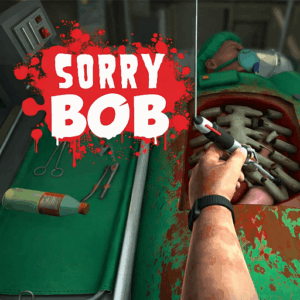
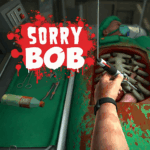
Sorry Bob is a hilariously chaoticsurgery simulation gamewhere you play as an unqualified surgeon controlling each finger of a clumsy hand individually — picking up scalpels, syringes, and saws while desperately trying to keep your patient Bob alive on the operating table. Every tool slips, every grip fumbles, and every second counts as Bob’s blood level drops. Play Sorry Bob free as abrowser gameon PLRun — no download, no sign-up, instant surgical chaos.
About Sorry Bob
Sorry Bob is afree online gameand HTML5 surgery simulator released on February 13, 2026 by AZ Games. You play as Nigel Burke, a man with zero medical qualifications but the unshakeable confidence of a seasoned doctor. Your mission is to perform increasingly absurd surgical operations on Bob — a poor, unconscious patient — using a physics-based hand where each finger is mapped to a separate key. This intentionally clumsy control scheme makes even simple tasks like gripping a scalpel or grabbing a syringe feel impossible, turning every operation into a slapstick comedy of errors. Success requires patience, coordination, and a tolerance for Bob’s rapidly declining health bar. With multiple surgery types, escalating difficulty, dark humor, and a physics engine that makes tools slip at the worst possible moments, Sorry Bob has become one of the most viralsimulation gamesavailable as an HTML5browser gameon desktop and mobile.
How to Play Sorry Bob
Basic Controls
Sorry Bob features a uniquely challenging control system where each finger is controlled independently:
- A— Pinky finger
- W— Ring finger
- E— Middle finger
- R— Index finger
- Spacebar— Thumb
- Mouse movement— Position the entire hand over the operating table
- Left click— Lower the hand toward the table to reach tools and the patient
- Right click (hold)— Rotate the wrist for better tool angles
- Mouse wheel— Zoom in and out on the operating area
On mobile, on-screen buttons replace keyboard inputs for finger control, with touch and drag handling hand positioning.
Gripping and Using Tools
The most fundamental skill in Sorry Bob is learning to grip tools without dropping them:
- Position your hand over the tool— Move the mouse to hover your hand above the scalpel, syringe, saw, or other instrument on the tray.
- Lower the hand— Hold left click to bring the hand down toward the tool.
- Close fingers around the tool— Press and hold the correct finger keys (A, W, E, R, Spacebar) simultaneously to grip. The more fingers you close, the tighter the grip.
- Lift and move— Release left click to raise the hand while maintaining your finger grip. Move the mouse to carry the tool toward the patient.
- Use the tool— Position it over the surgery area and perform the required action. Different tools require different hand angles, so use right-click wrist rotation to adjust.
Tools obey physics and can slip, bounce, or fly off the table if your grip is unstable. Mastering the grip-and-carry motion is the foundation of everything in Sorry Bob.
Managing Patient Health
Bob’s blood level is your primary constraint:
- Blood depletes when you cause injuries— Accidentally poking Bob with the wrong tool, dropping sharp instruments onto him, or making incisions in the wrong area all reduce his blood level.
- Blood depletes passively over time— Even without mistakes, the clock is ticking. You must work efficiently.
- Syringes restore blood— Grabbing and using a syringe on Bob stabilizes his health, buying you more time to complete the operation.
- Game over when blood hits zero— If Bob’s blood level empties before you finish the surgery, the operation fails and you must restart.
Surgery Types and Progression
Each level in Sorry Bob presents a different surgical mission with specific objectives:
- Basic operations— Simple tasks like removing an object or making a single incision. These teach you fundamental grip and tool control.
- Multi-step procedures— Complex surgeries requiring several tools used in sequence, testing your ability to swap instruments without dropping them.
- Timed emergencies— Urgent operations with faster blood drain, demanding speed alongside precision.
- New environments— Completing surgeries unlocks new operating rooms and increasingly bizarre medical scenarios.
Tips for Beginners
Start by practicing the finger grip on the first level without worrying about speed — learning which finger combinations produce a stable hold on each tool type is more important than rushing through the surgery. Use the syringe early and often to keep Bob’s blood level high while you learn. When carrying a tool, move the mouse slowly and smoothly; jerky movements cause the physics to destabilize your grip and fling the instrument across the table.
Sorry Bob Tips and Strategies
- Use three fingers for a stable grip, not all five
Pressing all five finger keys simultaneously seems logical but often causes the hand to clench awkwardly, making tools slip sideways. A three-finger grip (E + R + Spacebar for most tools) provides enough clamping force while keeping the hand posture stable enough to carry and position instruments accurately. - Rotate the wrist before lowering the hand, not during
Right-click wrist rotation while the hand is already lowered causes wild swings that can injure Bob or knock tools off the table. Adjust your wrist angle while hovering above the operating area, then lower the hand with left click once the angle is set. This separation of actions prevents accidental damage. - Inject the syringe first in every operation
Before touching any surgical tool, grab the syringe and top off Bob’s blood. Starting every procedure at maximum health gives you the largest possible error margin. Even a few accidental pokes will not kill Bob if his blood started at full. - Move the mouse slowly and in straight lines
The physics engine amplifies fast, erratic mouse movements into wild hand swings. Slow, deliberate mouse movements keep the hand steady and tools securely gripped. Think of it like carrying a glass full of water — speed creates chaos. - Zoom in for precision cuts, zoom out for tool changes
Use the mouse wheel strategically. Zoom in when making an incision or placing a tool precisely on the patient, then zoom out when switching to a different tool on the tray. This prevents the disorientation of trying to find instruments while zoomed into the surgery area. - Learn to release and re-grip rather than fighting a bad hold
If a tool is slipping or angled wrong in your grip, drop it intentionally and pick it up fresh. Trying to adjust a bad grip while holding the tool almost always makes the physics worse. A clean re-grip takes two seconds; a fumbled correction can take ten and injure Bob. - Complete the easier surgeries multiple times to build muscle memory
The finger coordination in Sorry Bob is genuinely difficult and requires practice. Replaying early levels until the grip-carry-place sequence feels natural prepares you for the multi-step operations in later levels where speed and coordination must both be sharp.
Game Features
- Individual finger control— Each finger is mapped to a separate key, creating deliberately clumsy but deeply skill-testing hand manipulation.
- Physics-based tool interaction— Scalpels, saws, and syringes obey realistic physics, slipping, bouncing, and flying when mishandled.
- Patient health management— Monitor Bob’s blood level constantly — injuries drain it fast, syringes restore it, and hitting zero means game over.
- Multiple surgery types— Progress through increasingly complex and absurd operations, from simple extractions to multi-tool emergencies.
- Dark humor and comedy— Intentionally difficult controls, over-the-top failure animations, and absurd scenarios make every mistake entertaining.
- Progressive difficulty— New environments, tighter time limits, and more complex procedures unlock as you complete operations.
- Wrist rotation mechanic— Right-click to rotate the hand for better tool angles, adding a layer of spatial control beyond just gripping.
- HTML5 browser game— Play instantly on desktop, tablet, or mobile with no plugins, downloads, or installation required.
Why Play Sorry Bob on PLRun?
- Play Sorry Bob online for free withno downloadand no registration — open the page and start operating instantly.
- Enjoy smooth physics simulation and responsive controls on desktop, tablet, and mobile browsers.
- Explore more simulation and comedy games in PLRun categories like
/simulation,/casual, and/funny. - Switch between Sorry Bob and related PLRun titles like physics sandboxes, ragdoll games, and skill-based simulators for endless variety.
Games Similar to Sorry Bob
- Surgeon Simulator— The original physics-based surgery game with floppy hand controls and dark medical humor that inspired Sorry Bob’s core concept.
- Ragdoll Flip— A physics-based stunt game where clumsy ragdoll controls create hilarious results, sharing the satisfying-frustration design.
- Ragdoll Playground— An open sandbox with ragdoll physics where you interact with objects and characters in unpredictable ways.
- Knife Master— A precision-based skill game where careful timing and angle control determine success, paralleling Sorry Bob’s demand for steady hands.
- Ice Baby Quest 2— A surreal adventure game with absurd humor and unconventional puzzle logic, matching Sorry Bob’s offbeat comedy tone.
FAQ
Is Sorry Bob free?
Yes, Sorry Bob is a free online game you can play directly in your browser on PLRun. There are no paywalls, subscriptions, or hidden costs — just load the page and start your first chaotic surgery for free.
Can I play Sorry Bob on mobile?
You can play Sorry Bob on mobile devices because it runs as an HTML5 browser game. Open PLRun on your phone or tablet, load the Sorry Bob page, and use on-screen virtual buttons for finger control with touch-based hand positioning. Desktop is recommended for the most precise control experience.
How do you play Sorry Bob?
Use A, W, E, R, and Spacebar to control individual fingers, move the mouse to position the hand, hold left click to lower it, and right click to rotate the wrist. Grip surgical tools by closing multiple fingers, carry them to the patient, and complete the operation before Bob’s blood level runs out in this physics-based surgery simulation browser game.
What are the controls for Sorry Bob?
The controls map each finger to a key: A (pinky), W (ring), E (middle), R (index), Spacebar (thumb). Mouse movement positions the hand, left click lowers it, right click rotates the wrist, and the mouse wheel zooms in and out. Combining finger keys creates grips for picking up and using surgical tools.
Is Sorry Bob safe for kids?
Sorry Bob features cartoon-style surgery with dark humor, intentionally clumsy physics, and comedic failure animations. While there is no realistic gore, the game involves operating on a patient with tools like scalpels and saws, so parents of younger children may want to review the content. It runs safely in the browser without downloads.
Does Sorry Bob require download?
No, Sorry Bob does not require any download when played on PLRun. The game runs entirely in your browser as an HTML5 game, so you can start playing instantly on any modern device without installing software or using storage space.
Pleaseloginto comment.