












Only Up: Parkour
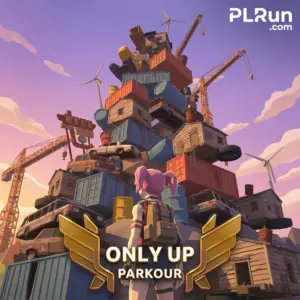
Only Up: Parkour is a free 3D vertical-climbing action game where you jump, wall-kick, and ledge-grab your way up a junk-filled, post-apocalyptic tower without falling. It runs directly in a web browser as an HTML5 title, with no download, install, or account required on the host pages where it is listed.
The core loop is simple: keep going up. There are no enemies — the environment is the challenge, and falls set you back rather than ending the run. Players who enjoy skill-based platformers like the original Only Up! or floating-platform parkour games will recognize the tempo immediately.
New players should know two things up front: (1) the game rewards rhythm and route-reading over raw speed, and (2) mobile/touch support is claimed by the host but the game is easier to control with a keyboard and mouse on desktop.
At a Glance
- Genre:3D vertical parkour / action platformer
- Core Play:Climb as high as possible by chaining precise jumps, wall-kicks, and ledge grabs up a post-apocalyptic tower
- Controls:Desktop — WASD/Arrows to move, Space to jump, Shift to sprint, C to crouch/slide; Mobile/Tablet — on-screen joystick with tap-to-jump on the right side (verify in-game)
- Platform:Web browser on desktop, laptop, tablet, and mobile (per host page)
- Modes:Single-player ascent against the environment; no documented multiplayer
- Download Required:No — HTML5 browser play
- Best For:Players who enjoy skill-based platformers and run-back-from-mistakes climbing games
- Difficulty:High; friendly to start, demanding to master
About Only Up: Parkour
Only Up: Parkour is a solo vertical platformer set in a post-apocalyptic environment where you climb a tower assembled from junk, trash, and improvised platforms. The goal is altitude; the obstacle is your own jump timing and stamina management.
Players stay engaged because every fall is recoverable — the game saves your highest altitude rather than resetting you to zero, which removes the usual “why bother” frustration of hardcore climbers. That design choice is the clearest difference between this title and many stricter parkour games.
It suits players who enjoyed the original Only Up! on PC and similar free browser climbers like Only Up 3D Parkour: Go Ascend, but want a shorter, more accessible session without an installer. There is no combat, no story beats, and no unlock system in the documented build — the reward is the climb itself.
How to Play Only Up: Parkour
Reach the highest point you can without giving up. Movement is standard platformer fare — walk, run, jump — with secondary moves like wall-kicking and ledge-grabbing becoming necessary as you climb. Stamina gates how aggressively you can sprint and grab, so pacing matters more than reflexes.
Controls (Desktop)
- WASD / Arrow Keys— move
- Spacebar— jump (hold for a higher jump)
- Shift— sprint (drains stamina)
- C— crouch / slide
Controls (Mobile & Tablet)
- On-screen joystick— movement
- Tap the right side of the screen— jump
- Swipe up on the right side— sprint
These are the controls listed on the host page; confirm them in-game, as touch layouts can change between builds.
Objective and Flow
Ascend. There is no strict fail state — falling is a setback, not a game over. A normal sequence is: scan 3–4 moves ahead, commit to the chain, then stop on a stable platform to let stamina refill before the next push.
Core Mechanics
The two mechanics beginners underuse arewall-kick(jumping into a flat wall and jumping again quickly to redirect) andledge-grab(catching a lip to prevent a full fall). Stamina is the budget for both.
What to Do in Your First 5 Minutes
Don’t sprint. Walk the first section so you can see how jump distance, platform spacing, and stamina drain feel before speed becomes a factor. Practice landing on the center of platforms rather than edges.
Try one wall-kick and one ledge-grab intentionally, even if you don’t need them yet — muscle memory for these inputs is what separates casual climbers from people who actually make it high. Ignore cosmetic effects and scenery until basic movement feels natural.
Beginner Tips for Only Up: Parkour
Most early falls come from rushing route-reading, not from hard jumps. Slowing down by 2–3 seconds before a complex section prevents most blind-leap mistakes, which is the pattern consistently called out in the host’s own playtesting notes.
- Don’t hold the jump button continuously.Tapping it in a steady rhythm conserves stamina compared to constant sprint-jumping; the host’s testing data specifically flags this.
- Use the crouch/slide at jump apex.Pressing C near the top of a jump shrinks your hitbox, which is needed for tight gaps.
- Wall-kick for direction, not just distance.Jump into a wall and jump again quickly to redirect — this is the fastest way to correct bad approach angles.
- Let stamina regen while standing still.Standing fully still recovers stamina faster than walking; plan rests at wide platforms.
- Use headphones for audio cues.The host notes that low-frequency audio signals precede platform collapses; missing them is a common avoidable death.
- Launch from the edge of platforms.Taking off from the very lip of a platform adds a small distance buffer on long jumps.
- Treat falls as resets, not failures.Because altitude is saved at checkpoints, a fall loses you time, not progress.
What New Players Usually Get Wrong
The single biggest misconception is that Only Up: Parkour is a speed game. It is a rhythm and routing game with a stamina system, so sprinting blindly drains your budget before you reach the harder sections.
The second common mistake is ignoring secondary moves. Players who only walk, run, and jump will hit a ceiling fast — wall-kicks and ledge-grabs are the actual skill gates, not the basic jump. On mobile, expect touch controls to feel less precise than desktop keyboard + mouse for long sessions.
Features That Actually Matter
- Altitude-based checkpoint system— respawns you at your highest point rather than the start, which removes most rage-quit moments.
- Stamina-gated movement— sprint and grab share a budget, turning movement into a resource-management problem instead of pure reflex.
- Wall-kick and ledge-grab— the two secondary mechanics that actually determine how high you can go.
- HTML5/WebGL delivery— no download, loads in a browser tab, runs on desktop and mobile per the host page.
- No enemies, no timer pressure— failure state is falling, not being killed, which keeps runs forgiving to retry.
Can You Play Only Up: Parkour on Browser, Mobile, or Desktop?
Yes on all three, according to the host listing. The game is built in HTML5 and is published as a browser title that runs on desktop, laptop, tablet, and mobile without a download. The host lists compatibility with Chrome, Firefox, Safari, and Edge.
Desktop with a keyboard is the more reliable option because precise jumps and the C (crouch/slide) input are easier on physical keys than on a touch joystick. Mobile support is advertised, but control precision on a phone is inherently lower for a timing-based platformer.
Whether PLRun hosts or embeds Only Up: Parkour should be confirmed on the PLRun page itself; this article does not assume availability on PLRun.
Games Like Only Up: Parkour
- Stickman War— for players who want action platforming with different challenges.
- Wave Rider— keeps the reach-as-far-as-possible session pacing without parkour controls.
- Ragdoll Launcher— a lighter, physics-based “go as far as you can” alternative.
- Slope Xtreme— different axis, same “one mistake resets you” tension.
- Rise Hero— for players who liked the vertical-progression hook.
FAQ
Is Only Up: Parkour free to play?
Yes. The host lists the game as free, browser-based, and with no in-game purchases or sign-up required.
Can I play Only Up: Parkour on mobile and PC?
Yes. The host page lists it as browser-playable on desktop, laptop, tablet, and mobile; keyboard + mouse on desktop is generally more precise for timing-based jumps.
Do I need to download anything?
No. It is an HTML5 browser game — load the page and it runs.
Is Only Up: Parkour multiplayer?
No multiplayer is documented in the published build. It is a single-player climbing challenge.
What are the controls?
Desktop: WASD/Arrows to move, Space to jump (hold for higher), Shift to sprint, C to crouch/slide. Mobile: on-screen joystick, tap the right side to jump, swipe up on the right to sprint. Verify in-game as host builds can update.
How do I perform a “Mantle Jump”?
According to the host’s own tips, pressCat the peak of your jump to tuck your legs and shrink your hitbox; this is the move used to clear tight gaps. Confirm in-game behavior before relying on it in harder sections.
Pleaseloginto comment.