
TNTcraft
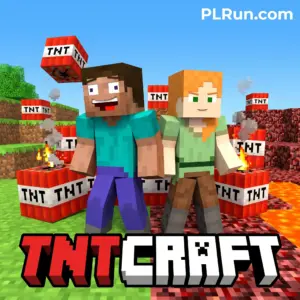
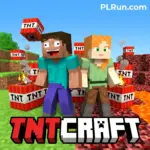
TNTcraft is a 2D top-down, Bomberman-style action game set in a blocky Minecraft-inspired world where you place TNT to blow up a zombie spawner before the horde overwhelms you. It was released in November 2022 by emolingo games and plays free in a desktop or mobile browser with no download required.
You can team up with an AI partner or sit next to a friend and play local co-op on the same keyboard, which makes it one of the simplest couch multiplayer picks in the browser. There is no online PvP mode and no account system — you load the page, pick a map, and start blasting.
If you enjoyed Bomberman-style chain explosions and the visual language of Minecraft, TNTcraft delivers that specific mashup without the complexity of survival crafting.
At a Glance
- Genre:2-player action / Bomberman-like, Minecraft-themed
- Core Play:Place TNT to destroy the zombie spawner and survive waves of zombies
- Controls:Player 1 — WASD to move, T to place TNT; Player 2 — Arrow keys to move, P to place TNT (host build)
- Platform:Web browser on desktop, mobile, and tablet; also listed on the CrazyGames App for Android
- Modes:Co-op with AI teammate or local 2-player on one keyboard, across four maps
- Download Required:No for browser play; Android users may optionally use the CrazyGames App
- Best For:Players who want a quick Bomberman-style session with a friend on one device
- Difficulty:Approachable; difficulty scales with zombie density and exploding zombie variants
About TNTcraft
TNTcraft is a top-down arena action game where two characters (human + human, or human + AI) cooperate to destroy a zombie spawner using timed TNT blasts while avoiding their own explosions and exploding zombies. The loop is short, tactical, and map-based rather than open-world.
The appeal comes from the Bomberman tempo — place, retreat, chain — fused with recognizable Minecraft-style pixel blocks and zombies. It suits players who want a quick local co-op match rather than a deep survival or crafting experience, because there is no mining, building, or persistent progression evident in the published build.
What meaningfully separates it from standard Bomberman clones is the zombie-wave pressure and the spawner objective: you are not only outlasting an opponent, you are racing to eliminate the source of enemies before exploding zombies reach you.
How to Play TNTcraft
Open the game in your browser, choose a map, and decide whether Player 2 is an AI or a local friend; then position TNT near zombies and the spawner, step away, and let the blast clear a path.
Controls
- Player 1:WASDto move,Tto place TNT
- Player 2:Arrow keysto move,Pto place TNT
These are the controls documented on the official CrazyGames host page; on-screen touch controls may appear on mobile builds, and players should verify in-game if the host site updates the scheme.
Objective
Destroy the zombie spawner with TNT while keeping both characters alive. Zombies spawn continuously until the spawner is gone, and some variants explode on contact, which can damage you or your teammate.
Match Flow
A round involves scouting the map, funneling zombies with terrain, placing TNT at safe chokepoints, and finally detonating the spawner once the area is clear. Four maps are available, each changing sightlines and safe-retreat distances.
What to Do in Your First 5 Minutes
Start with the easiest map and choose an AI partner for your first run so you can learn the blast radius without friendly-fire accidents. Place one TNT, immediately move two to three tiles away, and observe how far the explosion reaches — this is the single most useful thing to internalize early.
Ignore the spawner at first. Clear the nearby zombies, learn which ones explode, and only push toward the spawner once you have a reliable retreat route.
Beginner Tips for TNTcraft
A good first hour is mostly about spacing, not aggression — players lose more often to their own TNT and to exploding zombies than to being swarmed.
- Don’t stand next to TNT you just placed.The blast can kill you; take two tiles of distance minimum before it detonates.
- Identify exploding zombies early.Some zombies detonate on contact, so treat any unusual-looking zombie as a second bomb on the map.
- Use terrain to funnel zombies.Place TNT at chokepoints so one blast clears multiple enemies instead of wasting bombs on singles.
- Don’t rush the spawner.Clear a safe corridor first; dying next to the spawner wastes the trip.
- Coordinate with your partner.In local co-op, call out TNT placements aloud — most deaths happen because one player walks into the other’s bomb.
- Learn each of the four maps.Safe retreat distances differ between maps, so treat early runs as scouting.
- If solo, pair with the AI.The AI teammate helps absorb zombie attention while you position TNT.
What New Players Usually Get Wrong
Most new players treat TNTcraft like Minecraft and expect mining, crafting, or building — the game is strictly a Bomberman-style arena, and there is no evidence of a crafting or progression system in the published build. Approaching it that way leads to frustration in the first match.
The second common mistake is assuming TNT is a weapon you hold. It is a placed object with a delayed blast and a fixed radius, which means timing and retreat are more important than aim.
Features That Actually Matter
- Four maps— varied layouts change choke-point strategy and retreat routes.
- AI co-op partner— lets solo players access the 2-player design without a friend present.
- Local same-keyboard multiplayer— removes the need for accounts, lobbies, or a second device.
- Exploding zombie variants— add a risk layer beyond simple crowd management.
- Browser-based HTML5 (Unity WebGL) build— loads on desktop and mobile without installation.
Can You Play TNTcraft on Browser, Mobile, or Desktop?
Yes. TNTcraft runs in a modern web browser on desktop, mobile, and tablet, and is also listed on the CrazyGames App for Android. No download is required for the browser version.
Mobile play is supported by the host, but local 2-player on a single phone is impractical because the documented control scheme uses two separate keyboard regions (WASD/T and Arrows/P). For true 2-player sessions, a desktop or laptop keyboard is the more reliable option.
Performance depends on the host site’s WebGL performance and your device; older phones may see reduced frame rates in busy zombie waves. Whether PLRun hosts or embeds TNTcraft should be confirmed on the PLRun page itself; this article does not assume availability on PLRun.
Games Like TNTcraft
- Bloxd.io— shares the blocky Minecraft-style visual language with multiplayer arenas.
- MineFun.io— another browser Minecraft-inspired title with quick sessions.
- Zombie Derby: Blocky Roads— blocky zombie-themed action for players who liked the horde pressure.
- Lazy Apocalypse: Zombie Tower Defense— keeps the spawner-and-waves structure in a different format.
- Undead Invasion— for players who enjoyed the zombie-wave clearing loop.
FAQ
Is TNTcraft free to play?
Yes. TNTcraft is free on the official CrazyGames host and other listed browser portals, with no purchase or account required.
Can I play TNTcraft in my browser?
Yes. It is an HTML5 (Unity WebGL) game that runs directly in desktop and mobile browsers without installation.
Does TNTcraft work on mobile?
The host lists browser support on mobile and tablet, and the game is also available through the CrazyGames App on Android. Local 2-player on one phone is not practical given the documented two-region keyboard controls.
Do I need to download anything?
No for browser play. Android users may optionally install the CrazyGames App, but it is not required.
Is TNTcraft multiplayer?
It supports local 2-player on the same keyboard and a co-op mode with an AI teammate; there is no documented online multiplayer in the published build.
Who made TNTcraft?
TNTcraft was developed by emolingo games and released in November 2022.
Pleaseloginto comment.